

iPad not responding to touch – what it means and why the problem quickly gets worse | AppleGuru
Have you noticed that your iPad responds to touch only in some parts of the display?
Some areas work normally, while others ignore your finger completely or respond with a delay?
This is one of the most common problems, and – just as with iPhones – it gradually gets worse.
At AppleGuru we deal with faults like this every day. Below you'll find the main causes, how to tell the extent of the damage and when it is high time to come in for diagnostics.
1. Damaged touch layer (digitiser) – the most common cause
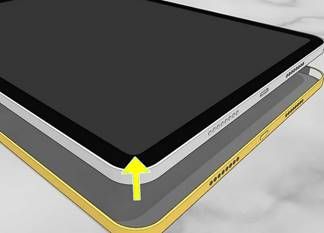
The most common reason an iPad responds only in places is a damaged digitiser. On most iPads the touch layer is part of the glass. Any crack, bend or microscopic damage causes touch to fail in specific zones.
Typical symptoms:
- the edges, corners or a “band” across the screen don't respond
- touch is slow or accurate only some of the time
- occasional “ghost touch” – the iPad taps, types or scrolls by itself
What causes it?
- dropping the device
- pressure in a backpack
- using it with cracked glass
- long-term wear
§ Solution: replacement of the touch layer (glass/digitiser), depending on the model
Want to know for certain whether the digitiser is the problem? Call us and arrange a quick diagnostic check
2. Bent iPad chassis – the hidden killer of touch
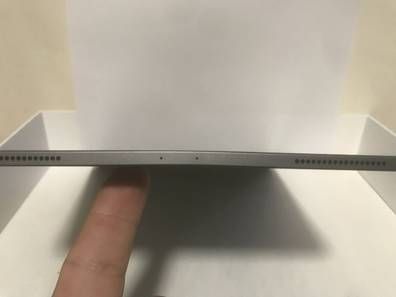
An iPad can bend, even ever so slightly – and that is often exactly what makes certain parts of the display stop responding.
Bending happens innocently enough: in a backpack, under pressure, when the iPad is carried between books or when someone sits on it.
Signs of a bent body:
- touch works only some of the time
- a wide strip of the display doesn't respond
- the deformation gets worse over time
- the display may crack later
§ Solution: straightening the chassis + replacing the glass or the display, book here
Suspect a bend? Book a diagnostic check – we'll find out the extent of the damage
3. Loose or damaged touch flex cable
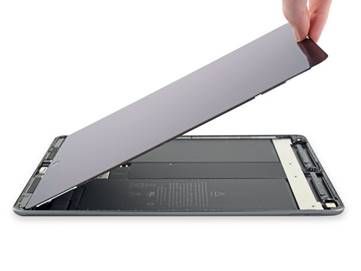
The digitiser is connected to the board by a thin flex cable. After a drop or pressure, the cable can come loose or tear, or the connector can be damaged.
How to recognise it:
- touch works only at a certain angle
- when you press on the spot, the display works temporarily
- touch sometimes works and sometimes doesn't work at all
§ Solution: repair or replacement of the flex cable, depending on the type of fault
Not sure whether the fault is in the cable or the display? Call us and arrange a diagnostic appointment
4. Damaged LCD panel – a problem with laminated displays
On models such as the iPad Pro, iPad Air 3+ and iPad mini 5+, the digitiser is bonded to the LCD.
If one layer is damaged, the other starts to fail as well.
Symptoms:
- a whole section of the screen doesn't respond
- lines, blotches or blurring appear
- touch behaves unpredictably
§ Solution: replacement of the complete display unit
Do you have an iPad Pro and touch works on only part of the display? Book an appointment and we'll run a detailed test
5. Faulty touch chip on the logic board
If touch fails even after the display has been replaced, or gradually gets worse even without a drop, the fault may be on the logic board itself – commonly referred to as the “touch IC”.
Typical signs of a board fault:
- touch works for the first second after the iPad is switched on and then stops
- the same area doesn't respond even after the display has been replaced
- touch freezes once the device warms up
- strange jumps or phantom touches appear
§ Solution: logic board repair (microsoldering)
Want to know whether the problem is in the display or on the board? Call us and arrange a diagnostic check
What are the risks if you keep using the iPad?
Using an iPad with part of the display not working often leads to further faults:
- touch stops working altogether
- taps happen by themselves (“ghost touch”)
- the LCD may get damaged
- the condition of the chassis gets worse
- the repair can become considerably more expensive (with laminated displays)
A touch problem never gets better by itself. The sooner you come in, the cheaper and quicker the repair
When do you need to come to AppleGuru?
Bring your iPad in for repair if:
- part of the screen doesn't respond
- touch responds only some of the time
- the iPad has been dropped or has bent
- touch is getting worse week by week
- phantom touches appear from time to time
- touch stopped working after the display was replaced at another repair shop
How a repair works at AppleGuru
- Diagnosis of the problem – digitiser, LCD, flex cable or board
- Precise identification of the fault
- A proposed solution and a clear price before the repair
- A quick repair according to the type of damage
- A touch test across the whole surface of the display
- A warranty on the repair
Want to know exactly what is wrong? Call us and arrange a diagnostic check
iPad not responding to touch? Drop by or give us a call
Don't underestimate the first symptoms – touch faults get worse quickly.