What should you do when the camera on your iPhone isn't working? Try our 3 proven tips that fix 80% of iPhone camera problems:
1/ Update the software
2/ Check the case or protective film
3/ Clean the lens
And now, how to go about it so that these 3 steps do the trick:
1/ Update the software
Apple improves the iPhone camera with every update of the iOS operating system. So if you have a problem, do update your device. It may just be a software issue that this step can easily clear up.
How do you do it?
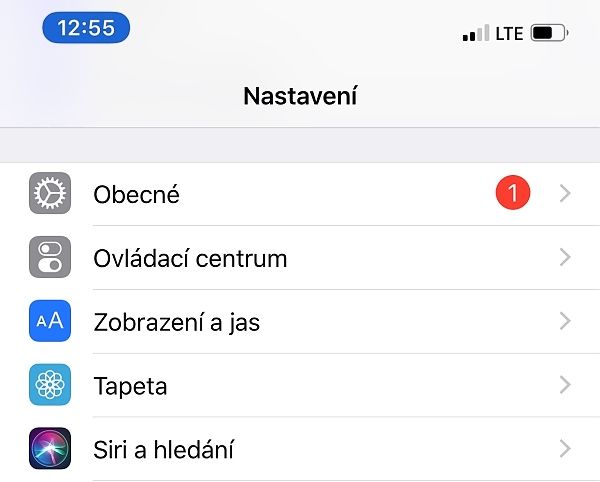
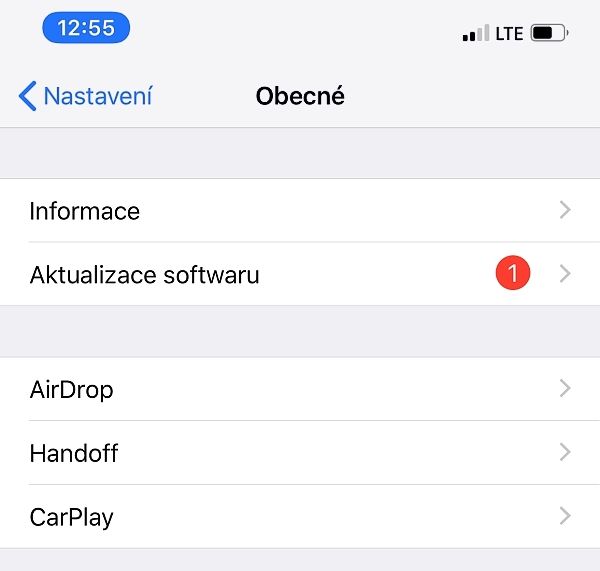
- Go to Settings -> General -> Software Update
- Choose Download and Install.
Figures 2_1 and 2_2: software update
In the phone's settings, choose “General”:
And here, choose “Software Update”:
2/ Check the case or protective film
Try the camera without the case or film.
These protective accessories can block the camera or the flash, or affect image quality. A metal or magnetic case, or an add-on lens, can interfere with optical image stabilisation.
3/ Clean the lens
Try this step first if the camera works but the photos are blurry, out of focus or “blotchy”. You may not even be able to see the dirt at first glance.
The best thing for cleaning lenses is microfibre cloths, like the ones for glasses or screens. You can buy a cloth in electronics shops or at an optician's.
If there's grease or other more stubborn dirt on the lens, try special wet wipes for electronics, which some chemists sell.
When does professional cleaning make sense?
Leave the cleaning to the professionals if:
- you can see dust or dirt inside the lens
- the lens seems to have shifted or to be obscured by something
The camera's optics are very delicate, so never attempt anything more invasive yourself. It isn't worth it.
Here at appleguru.cz we carry out professional cleaning from just 290 Kč.
You wash your car regularly, and you probably take it in at least once a year, after the winter, for a thorough clean to get the salt off and for a wax. Your phone was a sizeable investment too, and it also deserves professional care.
Time for a professional clean? Come and see us! We specialise in Apple products.
✆ 607 855 558
✉ info@appleguru.cz
Seifertova 683/83, Prague 3 – Žižkov
Camera repair
Have you tried all three steps and there's still a problem with the camera?
One last tip: restart the device and try different camera apps.
If, after opening the built-in Camera app, you see only a closed lens or a black screen, restart the device. Then test the camera in the Camera app and in another app that has access to it (Instagram, Facebook, Camera+ 2, etc.).
Also check whether the fault is on the main camera, the front camera, or both. The camera may of course also have been damaged by a drop, liquid getting in, and so on. In that case, a visit to a repair shop is unavoidable.