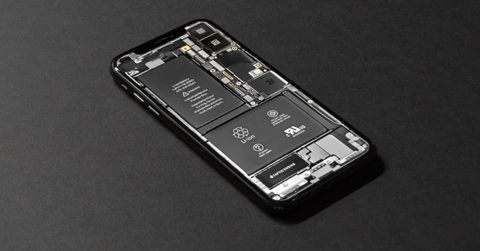
What is the battery capacity of an iPhone, and how long should the device last on a single charge?

Apple isn't forthcoming about the technical specifications of its devices. Its priority is the user experience. And it measures battery capacity by how long the battery lasts during calls, video playback and so on.
But when you want to compare individual models before buying, this indicator doesn't tell you much – especially as it can differ quite substantially from one year to the next owing to the development of the network or, conversely, its overloading in times of pandemic. Battery life is simply a rather variable quantity.
That's why it's worth comparing battery capacity in mAh – that is, in the ‘good old unit’, the ampere-hour. The ampere-hour is a unit of electric charge expressing the potential to supply a current of 1 ampere for 1 hour. So the higher, the better.
Apple doesn't publish these figures, so the data in our table is based on the results of laboratory tests carried out during the mandatory certification of Apple products, or on publicly available test results from specialist websites.
iPhone model | Battery life (h:min) streamed video | Battery capacity (mAh) |
iPhone 12 | 8:25 | 2,815 mAh |
iPhone 12 mini | 7:28 | 2,227 mAh |
iPhone 12 Pro | 9:06 | 2,815 mAh |
iPhone 12 Pro Max | 10:53 | 3,687 mAh |
iPhone 11 | 11:16 | 3,110 mAh |
iPhone 11 Pro | 10:24 | 3,046 mAh |
iPhone 11 Pro Max | 11:36 | 3,969 mAh |
iPhone SE (2020) | 7:12 | 1,821 mAh |
iPhone Xr | 12:24 | 2,942 mAh |
iPhone X | 10:49 | 2,716 mAh |
iPhone Xs | 10:12 | 2,658 mAh |
iPhone 8 | - | 1,821 mAh |
iPhone 7 | - | 1,960 mAh |
iPhone SE | - | 1,624 mAh |
iPhone 6 | - | 1,810 mAh |
Does your phone no longer last as long as it used to? Replacing the battery is one of the easiest ways to extend the life of your iPhone. If you're otherwise happy with the phone, investing in a battery costs considerably less than buying a new model. When is it time for a new battery? You can find out by checking the battery health in the phone's settings.
Checking your iPhone's battery health
You can check the battery health right on your phone:
1. In Settings, choose Battery
2. Choose Battery Health, where you'll see the battery's condition as a %
If the health is 83% or higher, the battery is still fine.
When to replace the battery in an iPhone
- if the battery health is below 80%, consider at the very least having professional diagnostics done at a repair shop
- if the battery health is below 60%, it's time for a battery replacement
The main warning signs of a bad battery also include:
- the phone doesn't last the whole day – you have to top it up during the day even though you haven't made that many calls
- the phone switches itself off
- the display is bulging – in this case visit a repair shop immediately, because the battery is probably swollen and in the worst case may even catch fire
- the phone won't switch on – this happens, for example, if you leave an older device "lying around" flat for a longer period.
Thinking about a battery replacement? Come and see us! We specialise in Apple products.
✆ 607 855 558
✉ info@appleguru.cz
The price of a battery replacement ranges from 900 to 3,000 Kč, depending on the type of phone.
In our price list you can look at the battery replacement prices by model in detail.
Also important is proper battery care, which can noticeably extend the battery's lifespan.