The loss or theft of an iPhone or iPad is an unpleasant situation. You don't just lose a device worth many thousands of crowns – your data goes missing with it too. And if it is poorly secured, someone may even “hack into” your iPhone, iPad or iPod touch and misuse your data. In this article we therefore look not only at how to deal with losing a device, but also at how to prevent further damage.
How to protect your iPhone against loss and misuse
1/ Back up
Keep automatic backup of your device to iCloud turned on. Every night all your new data will then be uploaded there. That comes in handy in many other situations too – if the device gets damaged, or even if you simply buy a new iOS device. You can then restore onto it with the minimum of fuss and easily get all your earlier data onto it. We describe how to back up your iPhone easily in a separate article.
2/ The Find My iPhone service
The second important step is to turn on Find My iPhone. It lets you find out where your device is and take further steps that will help you get it back and protect your information. The service doesn't just work with iPhones, iPads and iPod touches, but with almost all Apple devices, such as Mac computers, the Apple Watch and even AirPods, etc.
How to activate "Find My iPhone"
- Sign in:
- on a Mac or a PC, you do so on the web at icloud.com/find
- on an iPhone or another iOS device, you can install the free app from the App Store.
- Use your Apple ID to sign in.
How to find a lost iPhone
- Sign in at icloud.com/find (you can do this from any other device)
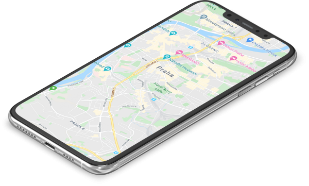
- Select the device whose location you want to see on the map
- If your device is nearby – for example, if you've mislaid it somewhere at home – you can play a sound on it to pinpoint its location more easily.
- If your device isn't nearby or you suspect it has been stolen, lock the device
How to lock an iPhone
- Sign in at icloud.com/find (you can do this from any other device)
- Take the device you want to lock and mark it as lost
- This locks the device remotely with a passcode, protecting your data and sensitive information
- Apple Pay is deactivated at the same time as the device is locked
- You can display a message on the lost device with your contact details so that it can be returned
- If the device is lost, you can get directions straight to its location
- If you suspect theft, report the loss to the Czech police; you can also tell them the device's location
- Be prepared for the police to probably ask you for the device's serial number. Where do you find it? On the original product packaging, the serial number is printed next to the barcode; you'll also find it on the original receipt or invoice. If, for example, you synced your iOS device with iTunes, you'll find the product's serial number in the Devices tab of iTunes Preferences.
- Report the loss or theft to your mobile operator as well. It will deactivate your account so that nobody can use your voice, text and data services.
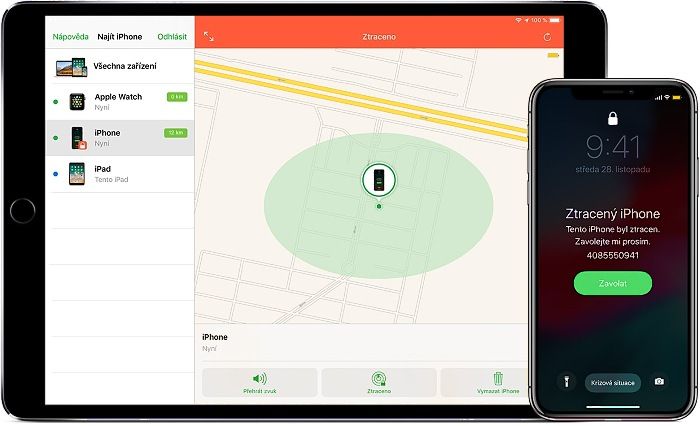
Find My iPhone is the only way you can track a lost device or find out where it is. If Find My iPhone wasn't turned on on the device before it went missing, there is no other Apple service that can help you find it, track it or flag it in any other way. So if you don't have the service active, turn it on right away. The only one who stands to gain from it is you, not a would-be thief.
Do you have really sensitive data on the device? Erase it.
If you want to stop anyone accessing the data on your lost device, you can erase the device remotely.
Advantages
When you erase the device, all your information is deleted from it (including the details of credit, debit and prepaid cards in Apple Pay).
Disadvantages
The downside of this step, however, is that it will no longer be possible to locate the device using Find My iPhone. On the other hand, you can be sure your data won't fall into the wrong hands. If you then remove the device from your account after erasing it, Activation Lock will be turned off on it. Someone else will then be able to activate it and start using it – so if you don't want to make the thief's job easier, watch out for this and don't do it.
What to do if Find My iPhone isn't turned on
If you didn't turn on Find My iPhone before your device was lost or stolen, you can't use it to locate the device.
- First of all, change your Apple ID password. This stops anyone getting at your data on the lost device or using other iCloud services.
- Change the passwords for all the online accounts you had saved on the device. That mainly means internet banking and e-mail, but also social networks such as Facebook, Twitter, Instagram, etc.
- Report the loss / theft to the police
- Contact your operator so that it deactivates your account.
- A message shown on the display of the lost device immediately tells whoever finds it whom to contact about returning it.
What if the lost iPhone is switched off or offline
This can happen if:
- your device runs out of battery
- it was switched off deliberately so that it couldn't be found
- it has moved out of range of the mobile operator's signal
You can still put the device into Lost Mode, lock it remotely or even erase it remotely. However, this will only happen once the device connects to the internet again. But if you remove the device from your account while it is still offline, all pending actions are cancelled.
Family Sharing
With this feature, any member of your family / sharing group can help you look for the device. You'll appreciate that most if you can't remember your Apple ID or your sign-in details for Find My iPhone and/or your e-mail (for example, because you only have them saved in your phone's memory – yes, that happens too). All it takes is for another family member to sign in to iCloud with their Apple ID, and they will then be able to find every device associated with that Family Sharing account.
Family Sharing has its advantages and its disadvantages. After all, you know exactly where all the devices in your family are at any given moment.
What to do once the device has been found?
If your lost device comes back to you, you can of course turn off Lost Mode yourself. You do so by entering the passcode on the device; it can also be turned off on the iCloud.com website or directly in the Find My iPhone app.
If a stolen iPhone or other Apple device is returned to you, we recommend visiting a repair shop to have the device checked – both for possible misuse of your data and for possible damage that you may not notice. We also recommend having the device professionally cleaned. You don't know who has been handling it, and you'll certainly feel more comfortable when your device is "yours alone again".
We're here for you and will be happy to help. Come and see us! We specialise in Apple products.
✆ 607 855 558
✉ info@appleguru.cz
Seifertova 683/83, Prague 3 – Žižkov