One of the most common faults with Apple's phone is surely that it simply freezes. What should you do in that situation? Simply restart your device. The procedure isn't the same for all models, though - in this article you'll find a simple guide, model by model.

Tip one: often all you need is patience
An iPhone usually sorts the problem out by itself. It just takes it a good while. Of course, there are situations that call for you to step in, not least because you simply can't wait, especially if you need to use the phone. So if your iPhone has frozen too, reset the phone following the guide below, according to which model you own.
Tip two: is the phone responding? Just turn it off and on again
Use a hard restart only if there's no other way
If your iPhone is still responding and is just very slow, all you need to do is turn it off and on again. The universal advice for all IT equipment works here too. Use the "hard restart" described below only if there really is no other way, because it isn't good for the device.
How do you turn an iPhone off?
- press and hold the On/Off button (the side button in the diagram below) until the slider appears on the display.
- as soon as the slider appears, drag it to the right ("slide to power off"). This turns the device off.
- the exception is the iPhone X, where you need to press the volume up button at the same time (the volume controls in the diagram below)
- once it has turned off completely, press and hold the On/Off button again until the Apple logo appears
If the device really isn't responding, there's nothing for it but to use a "hard restart".
Tip three: how do you restart an iPhone?
As we stress above, use this procedure only if the tips above don't work. Frequent "hard restarts" aren't good for devices. The procedure differs from model to model:
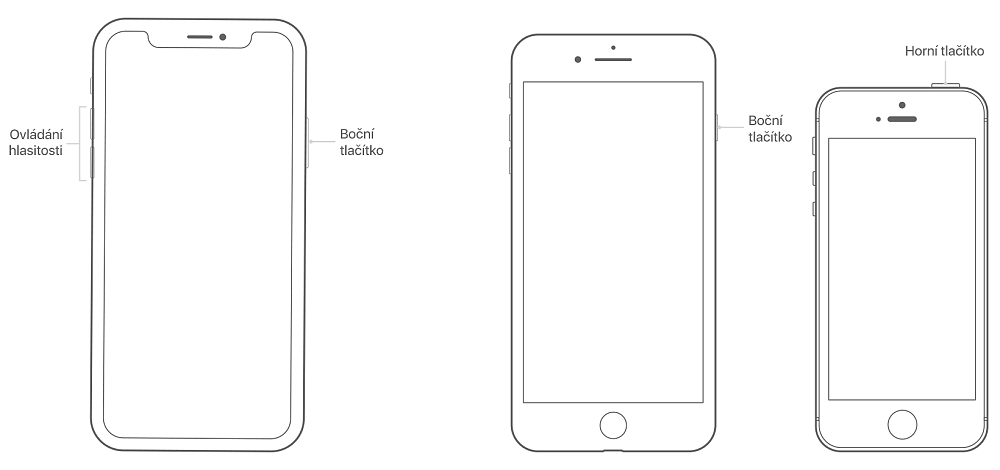
Restarting iPhone 8/8 Plus, X, XR, XS, XS Max, 11 and later
- quickly press and quickly release the volume up button
- quickly press and quickly release the volume down button
- press and hold the side button (on/off) until the Apple logo appears
Restarting iPhone 7/7 Plus
- press and hold the side button (on/off)
- and press the volume down button at the same time
- keep holding for at least 10 seconds, or until the Apple logo appears
Restarting iPhone 6s/6s Plus, SE and earlier
- press and hold the side button (on/off)
- and press the Home button at the same time
- keep holding for at least 10 seconds, or until the Apple logo appears
Device still not responding? Come and see us! We're specialists in Apple products.
✆ 607 855 558
✉ info@appleguru.cz
Seifertova 683/83, Prague 3 - Žižkov
you can also conveniently send us your device by courier