
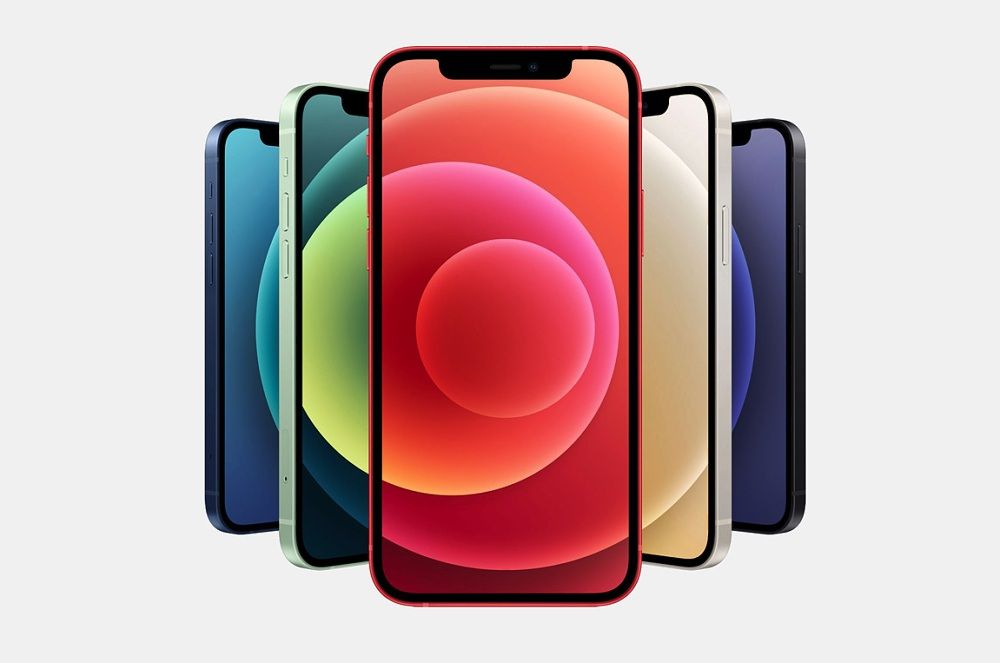
No new product gets by without "teething troubles" – not even one from the very best makers. Apple's iPhone 12 range suffers from a few bugs too. Fortunately there aren't many of them, and most are resolved by a system update, because Apple is working swiftly to get rid of them. The most common problems users report do have a simple fix, though. Here are a few tried-and-tested tricks.
Quick navigation:
1. Updating – first aid for most problems
2. Display – reduced sensitivity or a greenish tint
3. SMS – notifications don't appear
4. Problems with hearing aids
5. 5G not working
6. Wi-Fi and Bluetooth connection problems
7. Camera – not working
8. Poor battery life
1. Updating – first aid for most problems
Most iPhone 12 problems are minor bugs, mainly in the software. Some of them you may never even come across – if you don't use 5G or special headphones, for example. But if you do, your first step should be to update the system. It's very likely that the latest version of the system already fixes the problem in question.
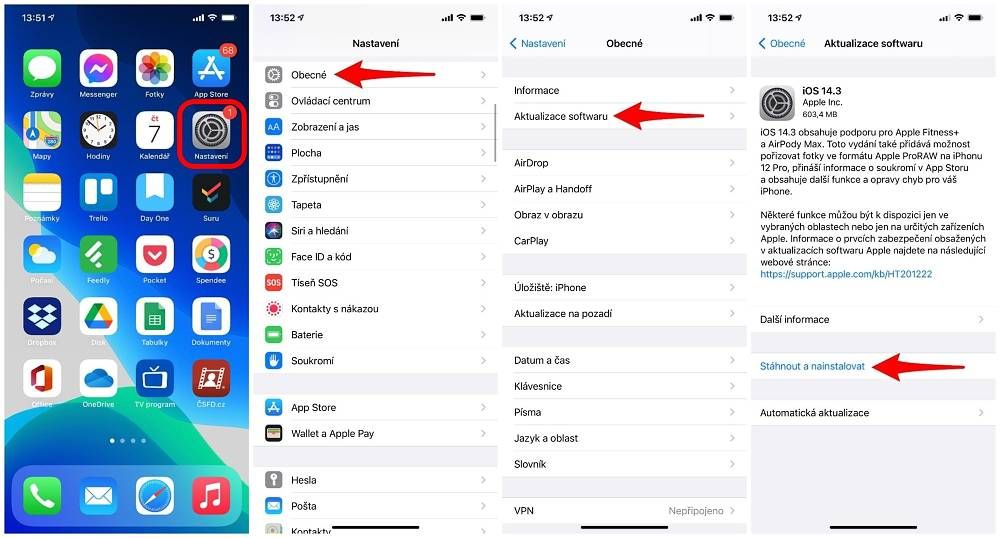
How to update an iPhone 12
- go to Settings -> General -> Software Update and, if a new version is available, tap Download and Install. You'll usually also find a description here of what's new in that version and which bugs it fixes.
2. Display – reduced sensitivity or a greenish tint
The iPhone 12 mini in particular can suffer from reduced display sensitivity on the Lock Screen. This makes it hard to unlock the phone with the swipe-up gesture, and just as hard to open the camera or turn on the torch. Once the phone is unlocked, though, the sensitivity problems no longer occur.
How to fix it:
- try changing the way you hold the device
- the problem also goes away if you connect headphones or a power cable to the phone.
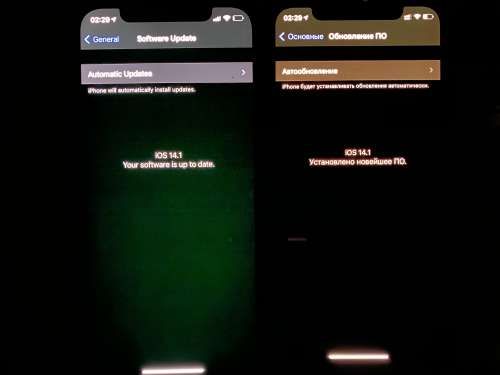
With Dark Mode switched on, you may also notice a greenish tint to the display. Only a small percentage of users suffer from this inaccurate colour rendering, though. Apple has already responded to the situation, so just check your operating system version and update to a newer one.
3. SMS – notifications don't appear
With the original iOS 14, the Messages app can behave somewhat oddly. An incoming SMS doesn't appear and you aren't notified of it, or, conversely, you hear the notification but can't find the message anywhere. This problem mainly affected the iPhone 12 and 12 Pro and their group chats.
How to fix it:
- run an update
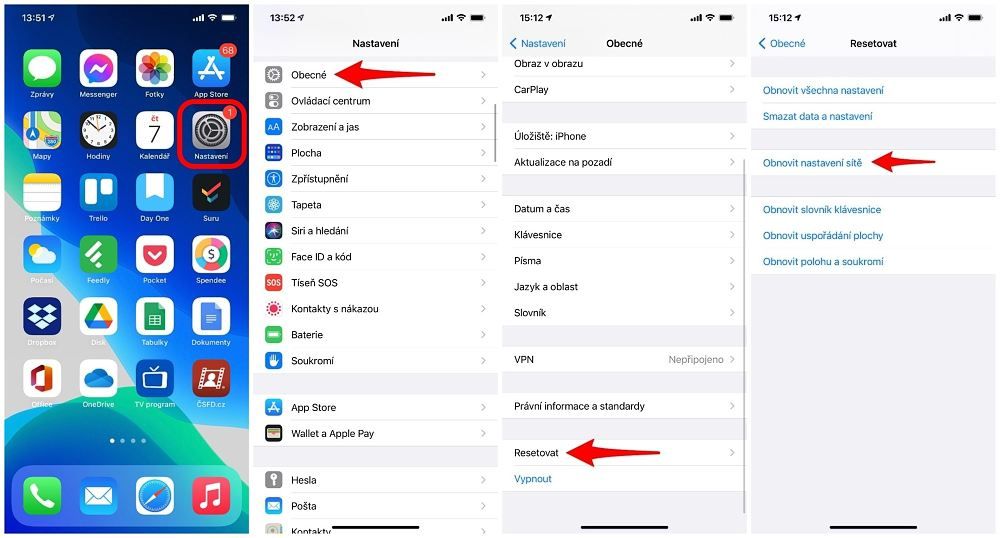
- if the update doesn't help, reset the network settings
4. Problems with hearing aids
Apple takes care to make its devices as accessible as possible to users with disabilities. That made it all the worse for them when the iPhone 12 models didn't get along with hearing aids – not even with those that carry MFi (Made for iPhone) certification. Apple took the whole situation to heart, however, and commented on the problem on its support website. There it mentions not only the individual problems the hearing aids suffer from, but also the remedy. And that is nothing other than a system update.
How to fix it:
- run an update – the new version of the system already fixes this problem
5. 5G not working
The iPhone 12 models are the first iPhones with 5G. And because 5G technology is still very much in its infancy in the Czech Republic, this connection – available only in the very largest cities – can come with various problems. If you know you're somewhere your network provider already offers 5G and you still can't ‘pick it up’, try updating your network provider settings.
How to fix it:
- update your network provider settings: Settings -> General -> About. If an update is available, it should be offered to you automatically.
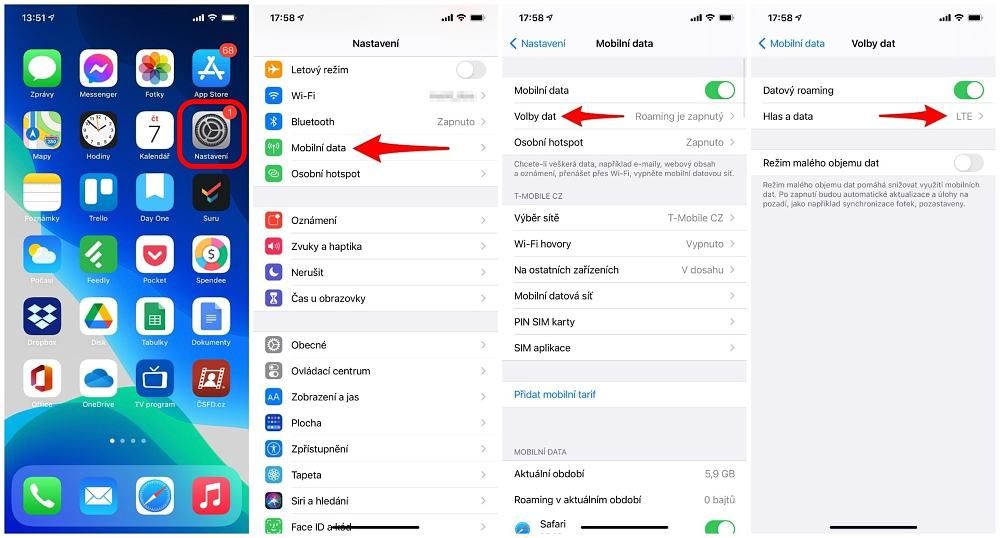
If it isn't available, your network provider hasn't prepared one for its customers yet and you have no choice but to wait until it does. But you can also turn 5G off. Just go to Settings -> Mobile Data -> Mobile Data Options -> Voice & Data and select only the LTE option.
6. Wi-Fi and Bluetooth connection problems
Because of 5G, Apple had to change various specifications of the iPhone 12 models, including the various antennas, transmitters and receivers. So it's not unusual for your Wi-Fi connection to fluctuate and for Bluetooth to connect to and disconnect from paired devices at random.
How to fix it:
- all you can do is update iOS and hope that the problem gets resolved.
7. Camera – not working
All iPhone 12 models offer optical image stabilisation on the main camera. It ensures that the pictures you take are properly sharp even when your body is shaking slightly. On the iPhone 12 Pro specifically, however, the stabilisation has a problem that has also turned up several times in the Czech Republic. Probably because components have come loose, the stabilisation is unable to focus, which makes using the main camera practically impossible.
How to fix it:
- unfortunately, the only solution in this case is a visit to a repair shop.
Drop in on us at appleguru.cz, for instance
Write to us or give us a call. On working days we respond within 24 hours.


8. Poor battery life
Because there's less room inside the phones' chassis, their batteries had to shrink as well – even compared with the previous generation, i.e. the iPhone 11 and 11 Pro, which should therefore, in theory, last longer on a single charge. However, Apple fitted the new models with the A14 Bionic chip, which is powerful yet economical, so the smaller battery shouldn't have a drastic effect on overall battery life.
After first switching on and setting up your new iPhone, though, you may think it definitely doesn't last as long as you'd expect. In that case it pays to wait and not to panic right at the start that the phone won't keep up with you all day. A considerable number of processes are running in the background and have to finish, and these naturally cost some energy (e.g. downloading photos from iCloud and so on).
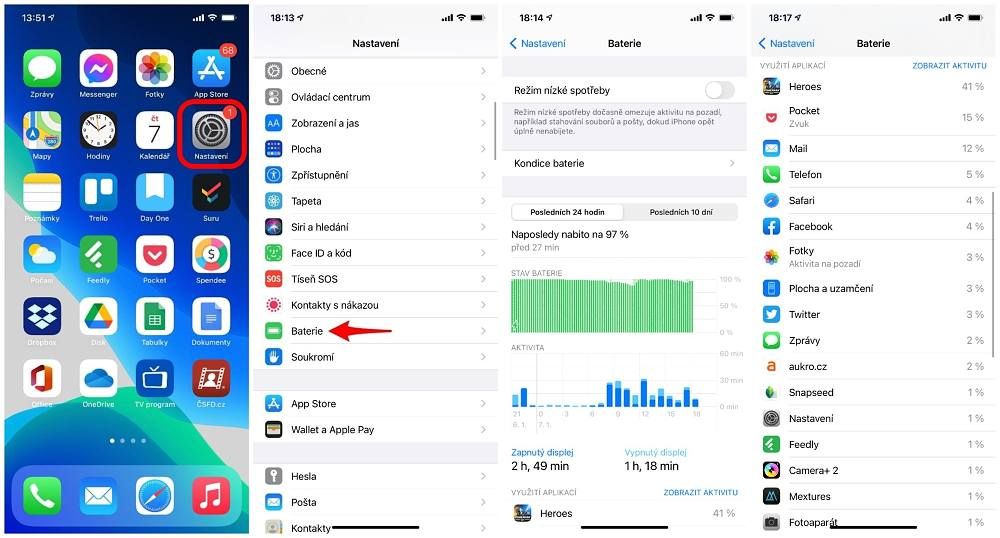
But if it seems to you that, even after a while, your new iPhone doesn't last as long as you'd expect, you can check where all its energy is going.
How to fix it:
- battery usage overview: Settings -> Battery. Here you'll see a summary for the last 24 hours as well as for the last 10 days. If you then scroll further down, you'll find the apps you use ranked by how much each one ‘eats’. This gives you a simple picture of whether everything is fine or whether some app is draining the battery more than it should. The fix is to use the app less, or to delete it outright.
Didn't manage to solve your problem?
Drop in on us at appleguru.cz, for instance
Write to us or give us a call. On working days we respond within 24 hours.
Source of the accompanying images: Apple.cz